
QuillBot Review 2026: Paraphrasing Tool, Grammar & AI Features
By Muhammad Shamir Taloo – Last updated: Sep 09, 2026
In this QuillBot review, we explore how this versatile AI-powered writing tool is helping users in 2026 with paraphrasing, summarization, grammar, citations, QuillBot Flow, and even AI-detection tools. Moreover, its free version allows new users to try out core functionalities before deciding to upgrade. However, with dozens of top AI writing tools now available, the question remains: does QuillBot’s blend of features justify its Premium pricing for regular users? Is QuillBot worth your time and money? This QuillBot review will cover that question in detail along with several others you might have in mind.
(You can explore QuillBot’s real-world accuracy and performance in detail in the QuillBot vs Grammarly Comparison where both tools are evaluated/tested side by side under practical writing conditions)
🕒 One-Minute Verdict
QuillBot stands out as a fast, smart, and versatile AI writing tool perfect for paraphrasing, grammar correction, summarizing, and tone refinement. Whether you’re a student aiming to avoid plagiarism or a content creator refining clarity, it delivers impressive results with minimal effort.
💸 The Top AI Gear’s Value-for-Money Score is 9.5 / 10
💡 This score is based on hands-on testing, productivity measurement, and feature comparison.
Summary Snapshot
✅ Strengths
- Highly accurate paraphrasing across multiple writing modes
- Seamless integrations (Google Docs, MS Word, Chrome)
- Quick, user-friendly, and perfect for both newcomers and experienced users
- Affordable pricing (just over $50/year for Premium)
⚠️ Drawbacks
- Doesn’t provide advanced long-form writing capabilities offered by tools like Jasper or Copy.ai
- Free version has limited characters and restricted modes
- It requires internet, offline support is limited
👥 Best For
Ideal for users who want faster, clearer writing while maintaining tone and originality.
💬 Editor’s Take
If you write often and need clean, clear, or creatively reworded text, QuillBot is worth it, especially the Premium version.
✍ 1. Why Trust This QuillBot AI Writing Assistant Review 2026? (Hands-on Testing)
From the outset, this review is rooted in authentic insight and data-driven analysis. Based on my hands-on trial and expert comparisons, I’ve used QuillBot extensively across writing workflows such as paraphrasing essays, polishing blog content, and handling research documents.
I’ve tested QuillBot across all its major tools, from the Paraphraser and Summarizer to the Grammar Checker, Plagiarism Checker, QuillBot Flow, AI Detector, Humanizer, AI Chat, Citation Generator and Translate feature. QuillBot’s paraphrasing tool lives up to its reputation. It offers a variety of modes such as Standard, Fluency, and Humanize, with the first two being freely accessible for up to 125 words. Moreover, its multilingual support across major languages like English, French, Spanish, and German is incredibly useful. A standout feature is the ability to rephrase a generated sentence multiple times, providing endless variations. When QuillBot highlights words in red, a simple click reveals a list of synonyms for easy replacement, enhancing vocabulary and originality.
In my hands-on trials, I found the Paraphraser especially useful for smoothing out blog drafts and essays, while the Summarizer and Grammar Checker worked reliably for condensing and polishing text. Some tools, like the AI Detector, were a bit hit-or-miss, but overall, QuillBot proved versatile and practical. To keep things transparent, I’ve included snapshots and detailed notes for each feature in the Core Features section, so you can see exactly how the tool performed in real use.
The detailed breakdown of these results, including real examples, metrics, and the final verdict, is covered in the QuillBot vs Grammarly Accuracy and Performance Tests. It highlights not only who wins on paper but also which tool performs better in everyday writing scenarios.
1.1 What Most Reviews Don’t Tell You About QuillBot
What most reviews don’t tell you about QuillBot is the cohesive power of its complete writing suite. Beyond paraphrasing, QuillBot offers a robust set of tools including Grammar Checker, AI Detector, Plagiarism Checker, AI Humanizer, AI Chat, Translator, Summarizer, and Citation Generator, alongside its impressive QuillBot Flow. Specifically, the Grammar Checker not only underlines errors but also provides a comprehensive writing score. It breaks down performance across Grammar, Fluency, Clarity, Engagement, and Delivery each rated out of 100. This detailed feedback and overall score are particularly beneficial for beginners, making it an incredibly insightful feature. You can find the full QuillBot vs Grammarly real-world performance test & verdict in the section below.
1.2 What Real Users Are Saying (Survey Metrics)
- ⭐ G2: 4.4/5
- ⭐ Trustpilot: 4.8/5
- ⭐ Capterra: 4.5/5
- ⭐ TrustRadius: 8.6/10
Overall User Sentiment: Strongly Positive
Most Praised Features: Paraphrasing Quality, Simplicity, Multilingual Support, Writing Suite
Most Common Criticism: Limited access to premium modes without subscription
1.3 QuillBot Review Summary
Because of my hands-on trial and expert comparisons, plus consistent feedback from verified users across major review platforms, you can be confident this QuillBot review is both credible and comprehensive. This combination of personal insight and third-party validation is what makes this review distinct especially compared to generic overviews that leave out unique benefits like AI Chat, AI Humanizer, and the QuillBot Flow feature.
🔍 2. What is QuillBot? Key Stats & Quick Overview
| Feature | QuillBot |
|---|---|
| Use Cases & Applications | Paraphrasing, Grammar, Summarizing, Translating, Citations, Co-Writing, Plagiarism Checking. (See All Features in Detail in this QuillBot Review) |
| AI Capabilities | QuillBot Flow, AI Detector, AI Humanizer, QuillBot AI Chat, AI Image Generator, Contextual Paraphrasing, Synonym Slider (Learn More About AI Features in this QuillBot Review) |
| Ideal Users / Target Audience | Students, Academics, Researchers, Bloggers, Copywriters, ESL Learners, Teams & Institutions. (See Who is QuillBot For?) |
| Free Plan? | Yes (limited features). (Compare Free vs. Premium vs. Team Plan) |
| Starting Price | Premium plan starts at $4.17/month, billed annually. Team Plans begin at $3.75/seat/month. (See Full Pricing Breakdown) |
| Comparisons | QuillBot vs Grammarly |
✍ 3. QuillBot Paraphrasing Tool Review: Performance & Modes Tested
3.1 QuillBot Paraphraser Tool
At its core, QuillBot’s Paraphraser stands out with eight unique rewriting modes, such as:
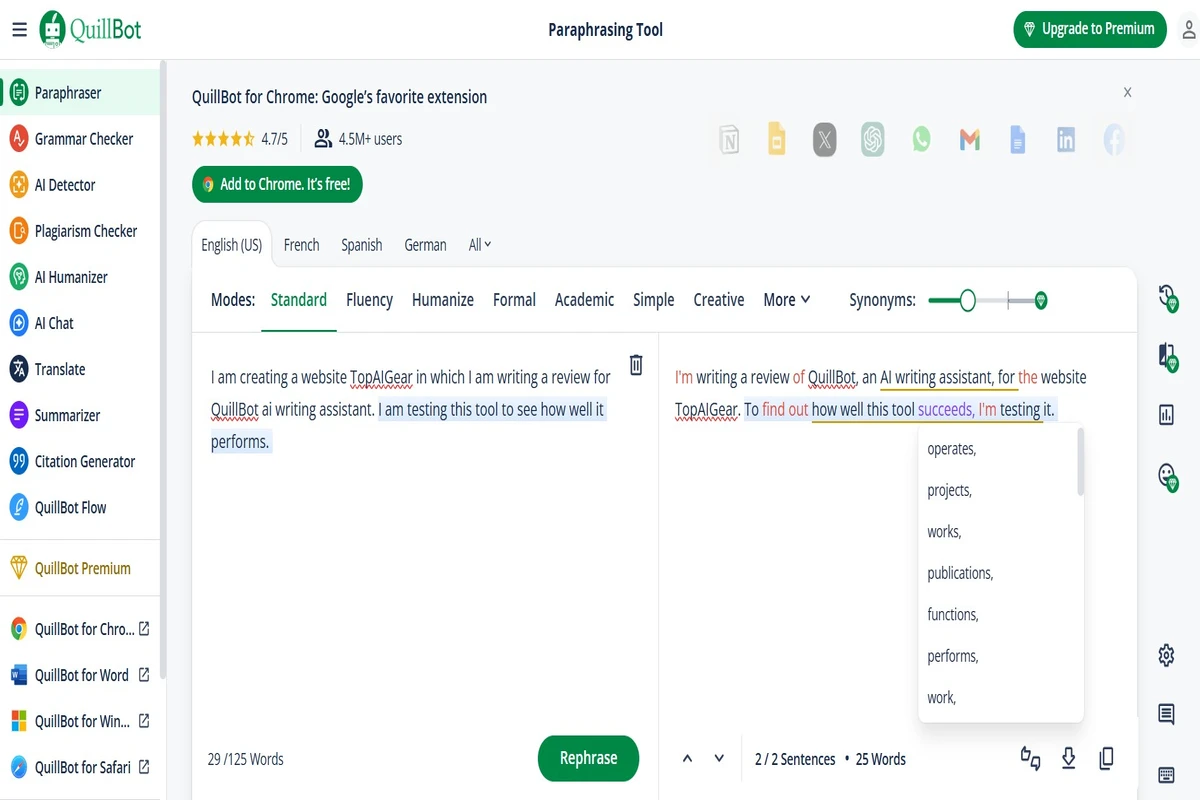
- Standard (balanced output)
- Fluency (grammatical corrections)
- Formal, Simple, Creative, Expand, Shorten, and Custom
When paired with the Synonym Slider, it gives users full control over tone and word choice style. This allows for rewriting text while preserving the original meaning perfect for content marketers, students, and researchers alike. You can also explore how it performs against Grammarly in the paraphrasing and rewriting comparison.
💰 4. QuillBot Pricing & Plans: Free vs Premium (2026)
QuillBot provides a solid free version along with a feature-rich Premium option and dedicated Team plans. The pricing structure is designed to cater to students, professionals, and teams making it accessible at various levels.
4.1 Free Plan
The free plan includes:
- Access to Standard and Fluency paraphrasing modes
- Basic grammar and spell check
- 125 words paraphrasing
- Generate basic summaries
- Humanize text in Basic mode
- Access AI Detector (1,200 words)
- Google Docs and Chrome extensions
Although its features are basic, the free plan works well for students or anyone who needs quick, simple paraphrasing.
The Premium plan unlocks:
- Unlimited, All 8 paraphrasing modes including Creative+, Academic, and Formal
- Expanded limits let you summarize up to 6,000 words in one go.
- Plagiarism Checker (up to 25K words/month)
- Co-Writer and AI Detection
- Advanced grammar and style suggestions
- Humanize text in Advanced mode
- AI Detector (unlimited words)
- Faster processing and more synonym options
Pricing (as of latest 2026 data):
- Annual: $50.04
- Monthly Equivalent: $4.17
Each subscription comes with a 3-day money-back guarantee.
4.3 Team Plans (Best for Businesses or Schools)
Team plans offer volume discounts based on the number of seats. All team members get access to Premium features, plus added collaboration tools.
Team Plan Includes:
- Team style guide & dictionary
- Admin panel and usage reports
- Writer management dashboard
- Centralized billing and data controls
📞 Contact Sales for a demo or custom enterprise quote.
4.4 Is QuillBot Free Enough?
QuillBot also offers one of the most generous free plans available today. If you’re comparing no-cost options, see the list of the best free AI writing assistants.
4.5 Is QuillBot Worth Paying?
Yes, QuillBot Premium is worth paying for, If you write frequently whether as a student, professional, or content creator QuillBot Premium delivers great value. You get faster results, advanced rewriting modes, and unlimited access to key tools.
Even better, QuillBot’s Team Plan suits businesses and schools. It includes collaboration features like team dashboards, centralized billing, and volume discounts (up to 30%).
So, whether you’re solo or managing a team, QuillBot Premium is worth every dollar if writing is central to your work.
🤖 5. Deep Dive into other QuillBot Core Features (Grammar, Summarizer, QuillBot Flow, Plagiarism, AI Humanizer, AI Chat & More)
QuillBot’s strength lies in its diverse AI-powered tools, built to streamline content creation, editing, and academic writing. Let’s explore each feature that makes QuillBot stand out:
5.2 QuillBot Grammar Checker
The built-in Grammar Checker highlights:
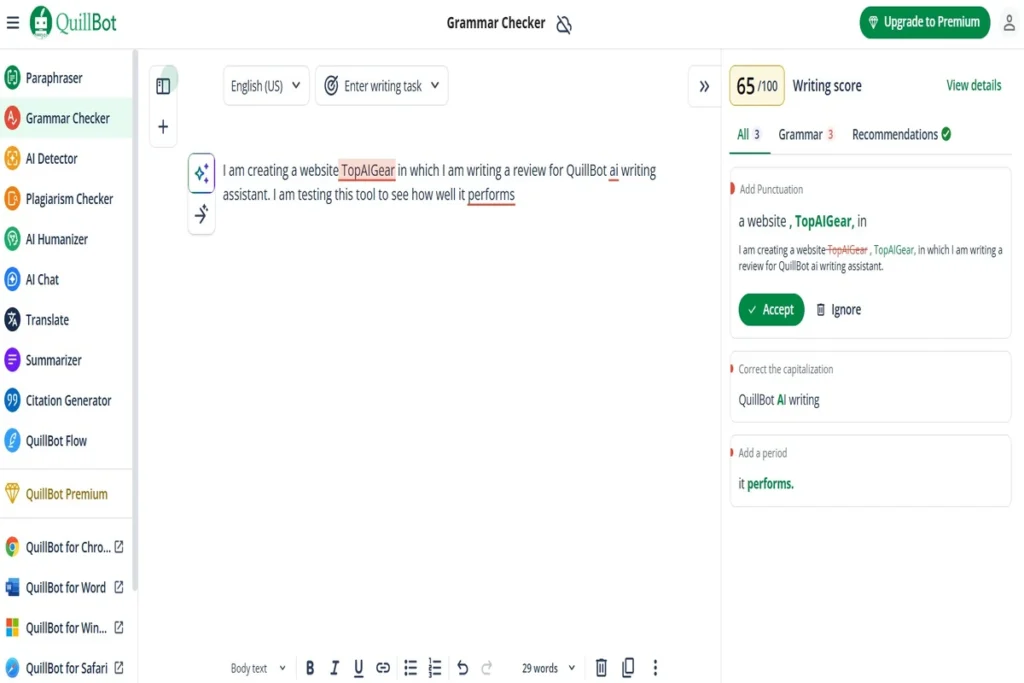
- Spelling errors
- Punctuation issues
- Sentence structure
- Readability enhancements
Although not as robust as Grammarly, QuillBot’s grammar checker is reliable for everyday writing and seamlessly integrated into its interface. In fact, when it comes to the accuracy of grammar checker, QuillBot now stands head-to-head with Grammarly in real-world writing performance.
5.3 QuillBot Summarizer
QuillBot’s Summarizer condenses up to 6,000 words (Premium) into either bullet points or a paragraph format. This is especially helpful for:
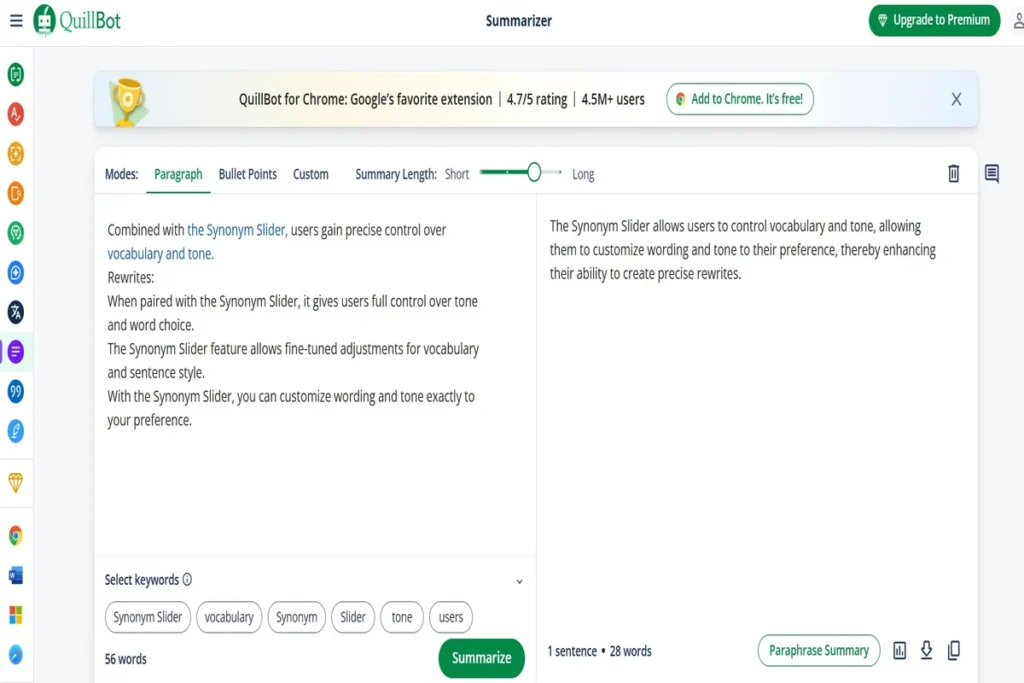
- Quickly reviewing long articles
- Extracting key ideas from research papers
- Creating digestible content briefs
5.4 Citation Generator & Plagiarism Checker
Academic writers will appreciate:
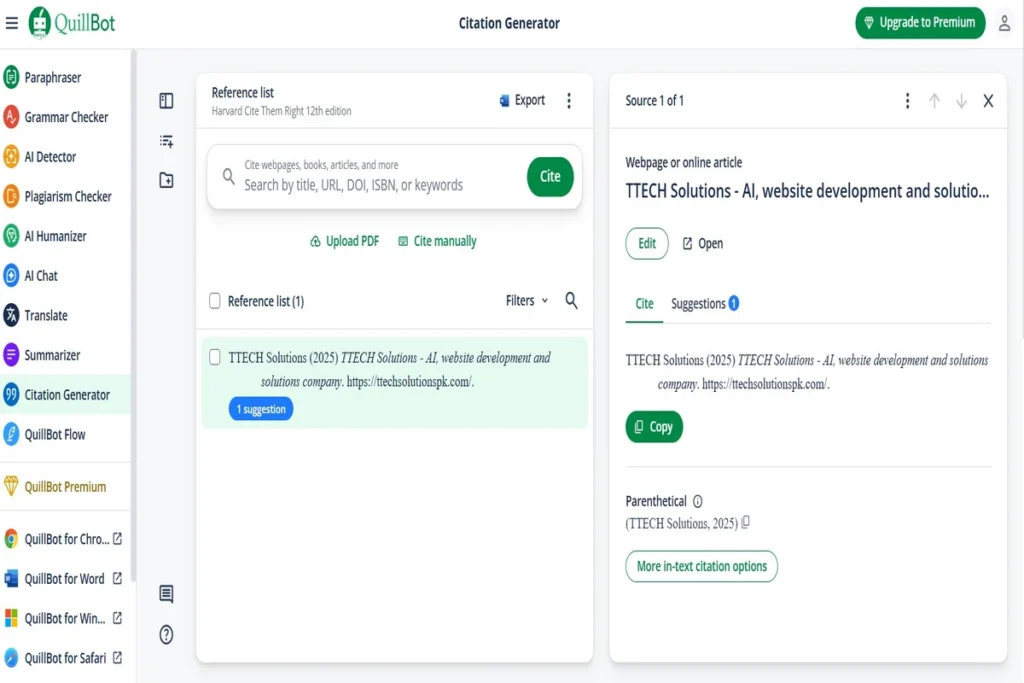
- The built-in Citation Generator handles APA, MLA, and Chicago formats, allowing one-click copying for quick referencing.
- The Plagiarism Checker scans up to 25,000 words per month in the Premium plan, making it ideal for maintaining originality in essays and research papers. You can explore how it performs in real testing under the robustness of plagiarism checking comparison between QuillBot and Grammarly.
5.5 QuillBot AI Detector
It also includes an AI Content Detector, which helps determine whether content was generated by AI, particularly useful in academia or professional publishing, where authenticity matters.
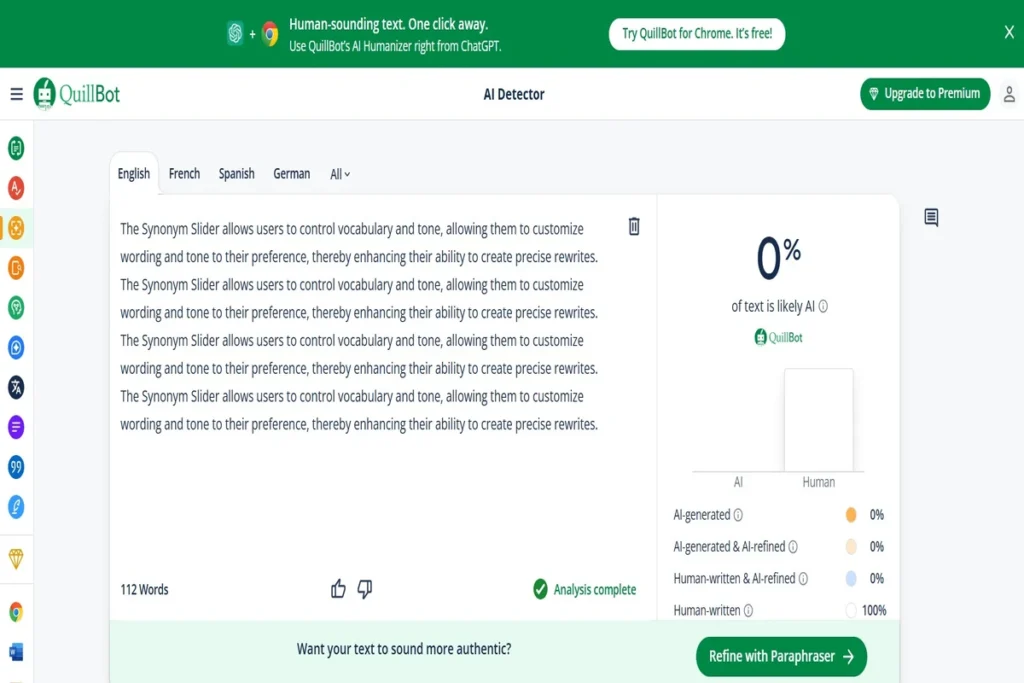
You can see how it performs in the AI detection comparison between QuillBot and Grammarly.
5.6 QuillBot Flow (formerly Co-Writer)
The QuillBot Flow functions as a central workspace, which now integrates an interactive conversational AI right next to your document editor, essentially turning QuillBot into a researcher that pulls live web sources while you draft.
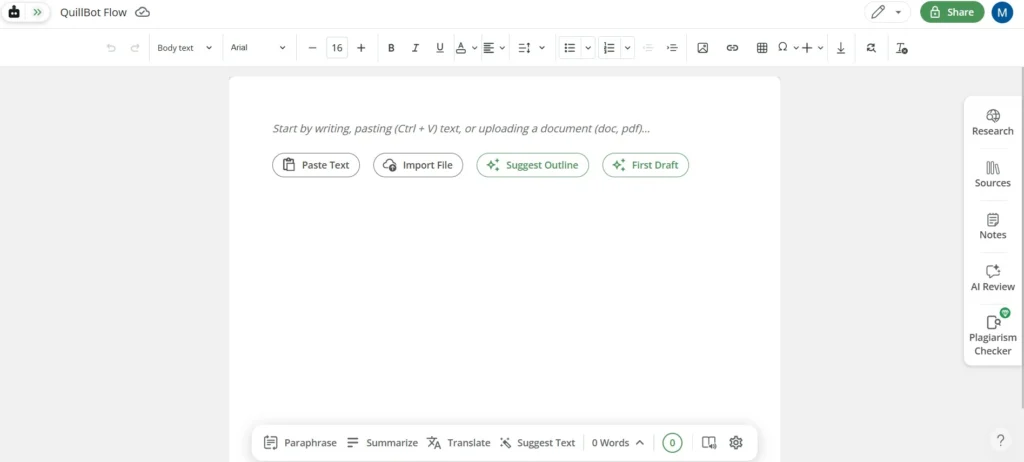
It brings together the Paraphraser, Summarizer, Grammar Checker, and more in a Google Docs-like interface.
5.7 QuillBot AI Humanizer
The AI Humanizer rewrites AI-generated content to make it sound more natural and “human.” Unlike standard paraphrasing, it:
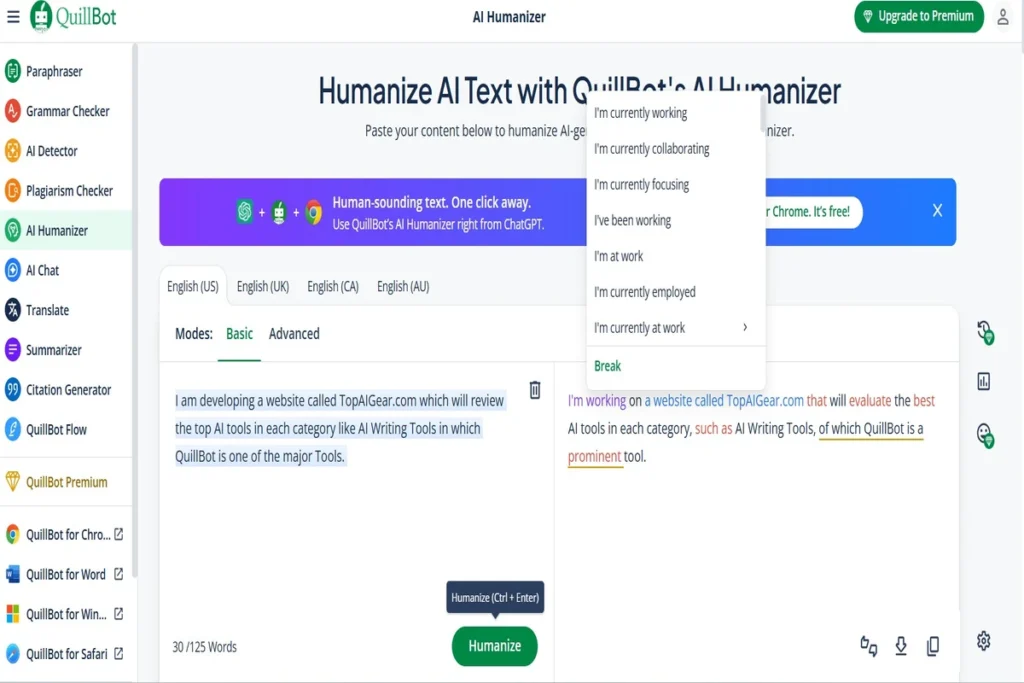
- Reduces robotic tone
- Adjusts sentence rhythms
- Increases emotional variation
This feature is especially useful when submitting AI-assisted content that must pass AI detection tools or feel more authentic to readers.
(See how AI compares with humans in writing in AI Writing vs Human Writing)
5.8 QuillBot AI Chat
An integrated AI Chat assistant allows users to:
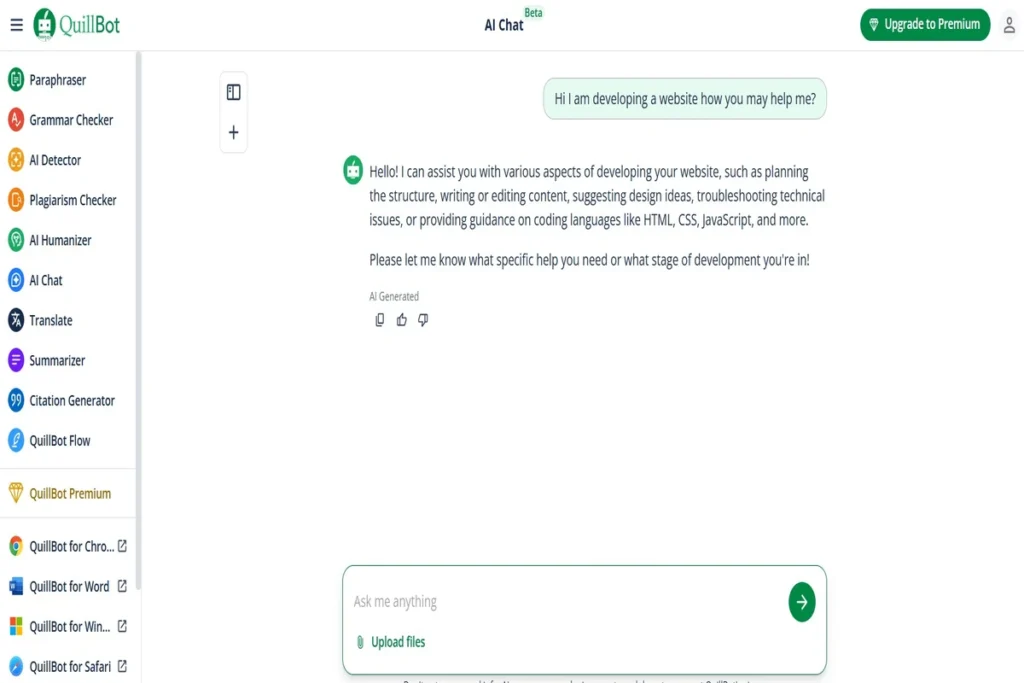
- Ask follow-up questions about text
- Get help with rephrasing or improving ideas
- Act like a smart writing tutor or assistant
Though basic compared to ChatGPT, it’s a convenient, in-app AI companion for writing support.
5.9 QuillBot Translator
QuillBot supports text translation into more than 45 languages, making it helpful for:
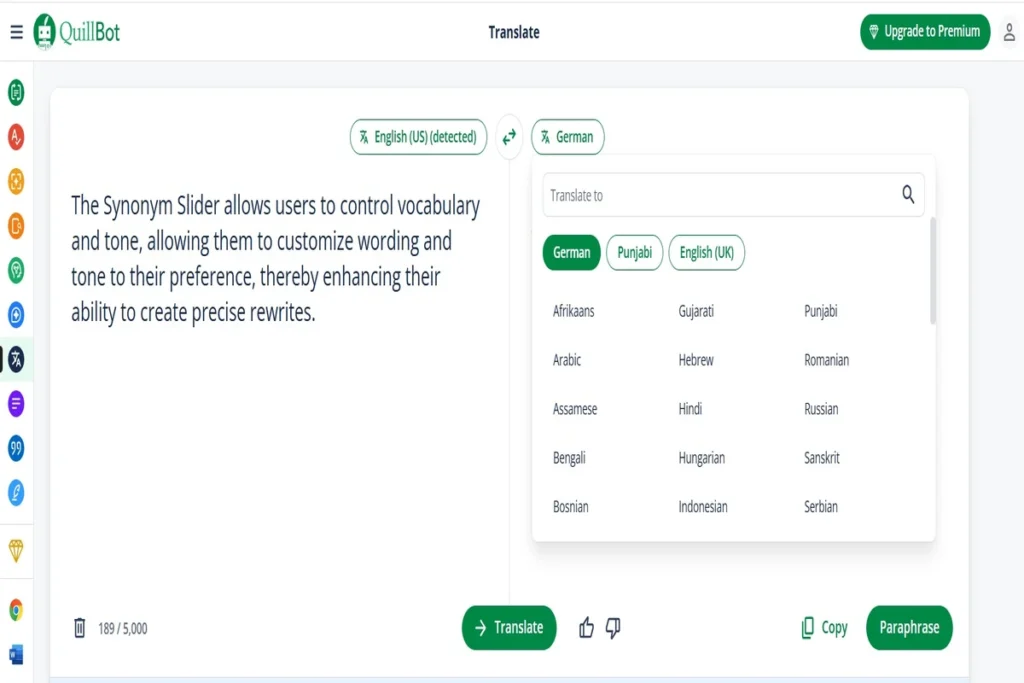
- Instant translation paraphrasing (translating non-English text and immediately restructuring it into native-sounding fluid English)
- Multilingual communication
- ESL learners improving English fluency
- Translating reference material
It’s lightweight, accurate for general use, and included even in the free plan.
5.10 Integrations & Accessibility
Enjoy hassle-free access to QuillBot across different writing tools and environments:
5.10.1 Desktop & Browser Integration
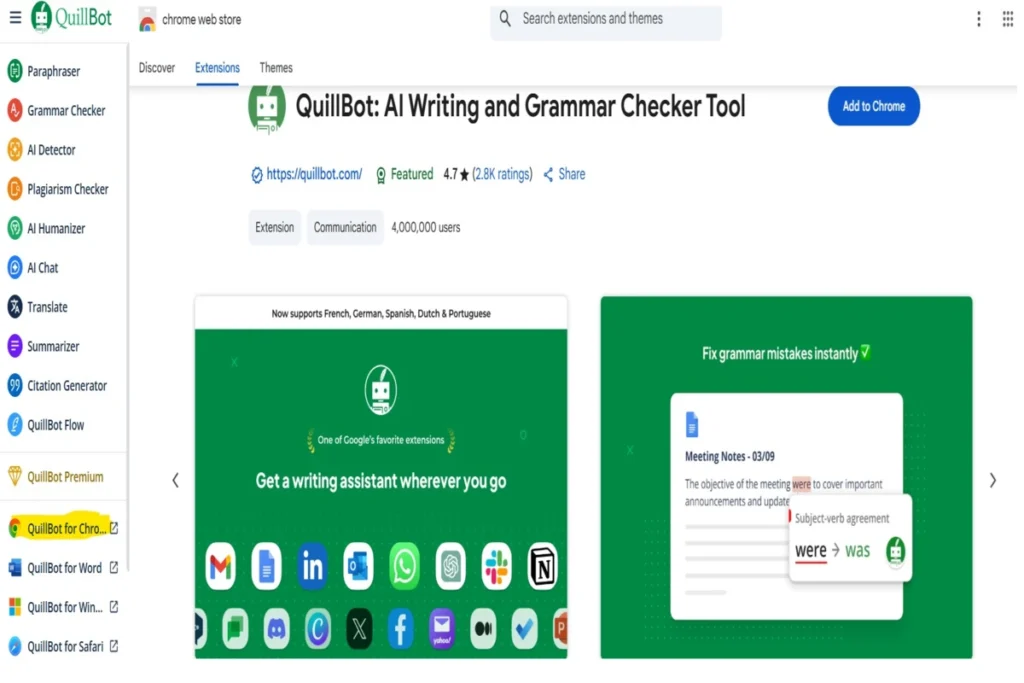
Its Chrome, Edge, and Safari extensions bring AI-based rewriting, grammar checks, and more directly into any web-based text field ideal for emails, blogs, and social media. For quick reference, the accompanying image highlights the location of QuillBot’s various extensions, including the popular Chrome Extension, found conveniently in the bottom-left section of the QuillBot website.
5.10.2 Microsoft Word & Google Docs Add‑Ons
QuillBot’s official integrations for Microsoft Word and Google Docs let you paraphrase, check grammar, and manage citations seamlessly within your documents.
5.10.3 Native Mobile Apps
Contrary to past assumptions, QuillBot now offers a mobile AI writing keyboard app for both Android and iOS, enabling paraphrasing, grammar corrections, AI detection, and translation directly within any app you type in.
5.11 Wrap-Up
QuillBot is more than just a paraphrasing tool, it’s a complete writing suite. From AI rewriting and grammar help to citations, summarization, and even AI detection, it gives you tools for every step of the content creation process.
⚖️ 6. QuillBot Review: Pros & Cons – A Balanced View
As with any software, QuillBot comes with both advantages and drawbacks. Here’s a quick but balanced overview:
| ✅ Pros | ⚠️ Cons |
|---|---|
| Offers multiple paraphrasing modes and synonym control | Free plan has strict word count limits |
| Includes summarizer and citation tools helpful for researchers | Co-Writer output often needs manual refinement |
| Affordable pricing on Premium & Team plans | AI Detector may return false positives |
| Features integrated grammar & AI writing checks | Plagiarism checker is capped at 25K words/month |
| User-friendly interface across platforms and extensions |
👥 7. Who Is QuillBot For?
This tool is built to cater to a diverse set of users:
✅ 7.1 Who Should Use QuillBot?
If you often work with text and need clarity, originality, or time-saving tools, QuillBot is for you. Here’s a closer look at specific groups:
🎓 7.1.1 Students & Researchers
Ideal for rephrasing academic content while preserving citation integrity.
✍️ 7.1.2 Content Writers
Great for overcoming writer’s block and rewriting articles quickly.
📊 7.1.3 Professionals
Perfect for simplifying reports, presentations, and emails.
🌐 7.1.4 Non-native English Speakers
Offers sentence restructuring and synonym suggestions to build fluency.
❌ 7.2 Who Might Look Elsewhere?
While QuillBot is excellent for paraphrasing and grammar, it may not fit everyone. Here’s who might consider alternatives:
📖 7.2.1 Fiction Writers or Bloggers
If creativity and long-form ideation are priorities, tools like Jasper AI may be more aligned.
🔍 7.2.2 SEO Writers
While QuillBot helps rephrase for originality, it lacks keyword tracking, optimization, or SERP analysis tools.
👥 7.2.3 Teams or Agencies
Grammarly or Writesonic offer better collaboration and project management features.
Ultimately, QuillBot serves anyone who writes frequently and values tools that enhance clarity, originality, and speed.
🚫 8. QuillBot Review: Who This Tool is NOT for?
QuillBot is strong at paraphrasing, summarizing, and rewording, but it might not be the best fit if:
- Your priority is advanced grammar and detailed style coaching, its grammar checks are generally less comprehensive than dedicated editors.
- You want robust AI content generation, QuillBot lacks a full AI text generator and isn’t designed for long-form drafts from scratch.
- You need fine-tuned tone or brand control, QuillBot doesn’t offer detailed style or branding features like some competitors.
- Your free use involves large text volumes, free limitations (e.g., paraphrasing character limits) can frustrate heavy users.
(You can explore QuillBot’s real-world accuracy and performance in detail in the QuillBot vs Grammarly Comparison, where this tool is evaluated/tested under practical writing conditions)
For editing plus generation, combining QuillBot with a more full-featured AI assistant is advised.
🔄 9. QuillBot vs Grammarly & Alternatives: How Does It Compare?
While QuillBot stands out for its paraphrasing capabilities, it’s not the only writing tool in the game. Let’s see how it stacks up against some popular alternatives:
9.1 Grammarly
If your priority is grammar correction and tone detection, Grammarly edges QuillBot in those areas. However, its pricing starts at $9 per month on an annual plan, making it a costlier option.
👉 Read Full Grammarly Review →
👉 Read QuillBot vs Grammarly →
9.2 Writesonic
It’s good for AI-generated long-form and short-form content, SEO optimization, multi-language support, GEO tracking but lacks paraphrasing and text rewriting capabilities which is where QuillBot shines. Ideal for content marketers, agencies, and teams needing full-stack content creation and AI visibility tracking.
👉 Read Full Writesonic Review→
9.3 Jasper AI / Copy.ai
These platforms excel at generating long-form content and producing AI-driven copy. Nevertheless, they fall short on dedicated paraphrasing features, which is where QuillBot excels.
9.4 ProWritingAid
Known for its comprehensive writing analysis and detailed reports, this tool offers in-depth feedback on structure, clarity, and style. However, it lacks modern AI tools like paraphrasing, summarizing, or chat-based assistance.
🚀 10. Getting Started: How to Use QuillBot
QuillBot is built for simplicity. Whether you’re paraphrasing an academic paper or polishing up business content, getting started takes just a few steps.
10.1 Sign Up & Access
To begin, create an account and choose the right plan.
10.1.1 Create an Account
Visit QuillBot.com and sign up with your email or a third-party login (e.g., Google or Facebook).
💡 Bonus tip: Immediately try the free plan to sample all core tools.
10.1.2 Choose Your Plan
By default, you’ll start on the free version. Alternatively, you can explore the benefits of Premium or Team plans via the account settings page.
10.2 Choosing the Right Tool
Once logged in, QuillBot offers a toolbar with different writing tools:
- Paraphraser (core tool for rewriting)
- Grammar Checker
- Plagiarism Checker
- Summarizer
- Translator
- Citation Generator
- Co-Writer (full writing assistant)
Each tool opens in the same dashboard, so switching between them is seamless.
10.3 Writing Workflow in Action
Here’s a basic QuillBot writing flow:
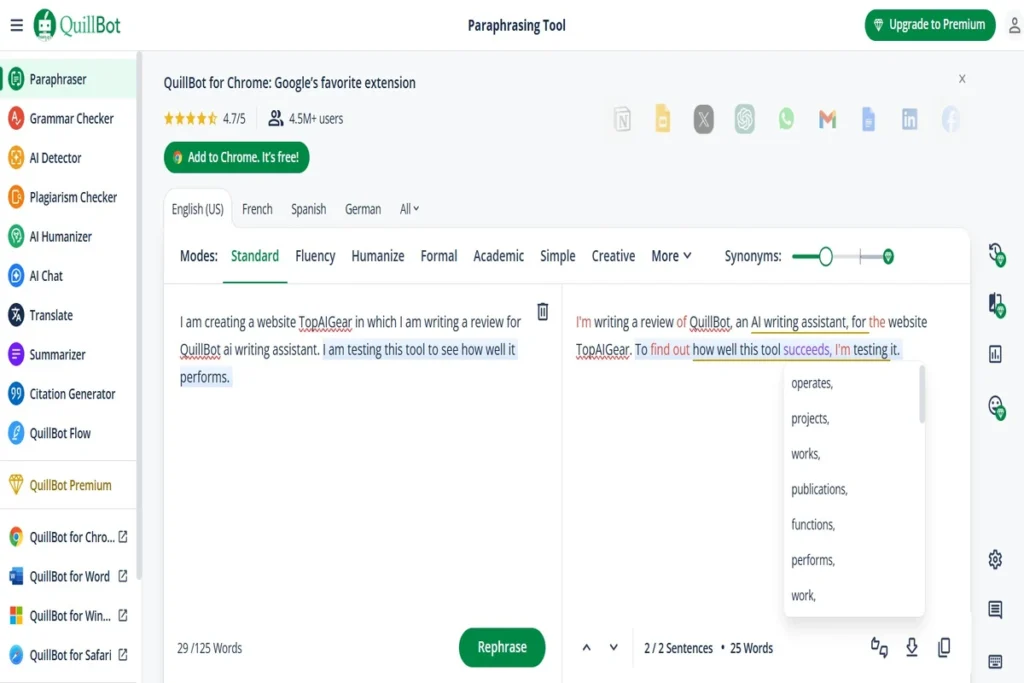
- Enter or paste your text in the editor.
- Select a paraphrasing mode such as Standard, Fluency, or Formal.
- Click Paraphrase.
- Instantly get rewritten output, complete with color-coded suggestions.
- Copy, export, or send your draft to the Co-Writer for further editing.
10.4 Accept/Reject Suggestions
10.4.1 Review Output
Once AI processes your input, suggestions will appear immediately.
10.4.2 Choose Your Words
Click on highlighted phrases to select from synonyms or manually tweak text.
Meanwhile, grammar corrections appear directly under spelling and punctuation errors.
10.5 Use AI Tools & Extensions
10.5.1 Install Extensions
Add the Chrome or Firefox extension for paraphrasing and grammar in-chat or online writing tools.
10.5.2 Use Integrations:
QuillBot supports Microsoft Word add-ins and Google Docs via browser, you can paraphrase or edit without leaving your document.
10.6 Set Writing Goals & Preferences
10.6.1 Adjust Synonym Slider
Increase or decrease synonym use to match your desired style.
10.6.2 Customize Flow
You can lock certain words or specify target tone, depending on your account plan.
10.7 Section Summary
After signing up, simply paste your text, pick a tool, review suggestions, and publish without switching tabs. QuillBot’s intuitive layout and seamless integrations let you workflow faster, saving time and mental bandwidth for writing.
🙋 11. Frequently Asked Questions (FAQs)
11.1 Is QuillBot Free to Use?
Yes, QuillBot offers a free plan with access to basic features like the paraphraser and summarizer, but with limitations (e.g., 125 words at a time). However, upgrading to QuillBot Premium plan removes limits and unlocks advanced features like tone adjustments, full-length paraphrasing, and plagiarism checks.
11.2 What Are QuillBot’s Main Use Cases?
You can use QuillBot for:
- Academic writing – Rewriting content while preserving meaning
- Business communication – Polishing emails and reports
- Content creation – Rephrasing blog posts, captions, or YouTube descriptions
- SEO writing – Avoiding duplicate content while keeping keyword context
- Learning English – Simplifying or restructuring complex sentences
11.3 How Accurate Is the Paraphrasing?
QuillBot is known for delivering accurate, natural-sounding rewrites in most contexts. Still, results may vary depending on sentence complexity, tone, and writing domain. That said, many professionals find it reliable enough for formal writing and content development.
11.4 Can QuillBot Be Trusted for Academic Work?
Yes, but with caution. QuillBot is useful for rewording and improving clarity, but academic institutions may have strict rules about paraphrasing and AI-generated content. Therefore, always check with your instructor and use the plagiarism checker for safety.
11.5 Does QuillBot Store My Data?
According to QuillBot’s Privacy Policy, they do not store your text inputs long-term. In contrast to some other tools, QuillBot prioritizes user privacy, especially for educational and institutional use.
11.6 Can I Use QuillBot Offline?
Currently, no. Because QuillBot operates on cloud-based AI, an active internet connection is necessary. Nonetheless, its browser extensions help you work faster even when switching between tabs or apps.
11.7 Is QuillBot Worth It in 2026?
Yes, QuillBot is worth it for professionals and students who need fast, accurate paraphrasing, grammar help, and writing clarity at an affordable price.
11.8 How Good Is QuillBot AI?
QuillBot AI is an AI-powered writing tool for paraphrasing and clarity and it is one of the best paraphrasing tools available, enhanced with grammar correction, summarization, citation generation, and customizable writing modes.
11.9 Does QuillBot detect plagiarism?
Yes, 25,000 words per month in Premium.
11.10 Can it translate text?
Yes, it includes translation for over 45 languages even in the free plan.
11.11 Is there a refund?
Yes, 3-day money-back guarantee on Premium
📣 Final Verdict – Should You Use QuillBot in 2026?
After a deep dive into its features, pricing, performance, and user feedback, it’s time to answer the key question:
Is QuillBot still worth it in 2026?
The Short Answer: Yes, But It Depends on Your Needs. QuillBot remains a top-tier AI paraphrasing tool, especially for those who prioritize:
- Concise, accurate rewrites
- Academic writing support
- Quick summarization and grammar correction
- Budget-friendly pricing
That said, it’s not a full-scale AI writing assistant like Grammarly or Jasper. If your goal is pure paraphrasing with smart automation, QuillBot nails it. But for generating original content from scratch or checking SEO content flow, alternatives might serve you better.
Why QuillBot Stands Out in 2026
- Smart Paraphrasing Modes – With seven distinct rewrite styles, you’re in control of tone, complexity, and length.
- Deep Grammar Integration – AI grammar suggestions feel more contextual and natural than generic tools.
- User-Centric Interface – Minimalist yet powerful, QuillBot’s dashboard allows even beginners to edit like pros.
- Real Value for Money – The annual plan remains affordable, with constant updates improving functionality.
QuillBot Review 2026: Editorial Ratings
| Category | Rating | Justification |
| Core Writing Assistance (Accuracy) | ★★★★★ | QuillBot provides strong grammar and paraphrasing tools and is now head-to-head in advanced grammar suggestions and deep writing feedback found in Grammarly or ProWritingAid. |
| Generative AI & AI Detection Capabilities | ★★★★☆ | QuillBot offers an AI writer and summarizer, its Generative AI capabilities are still limited in creative writing, narrative content, or tone variation. Great for short-form rewrites but not a replacement for Jasper or Writesonic. |
| Ease of Use (UI/UX) | ★★★★★ | Clean interface, instant toggles, slider controls (for creativity/formality), and no learning curve make QuillBot user-friendly even for beginners. |
| Integrations & Accessibility | ★★★★★ | Chrome Extension, Microsoft Word, and Google Docs add-ons work seamlessly. Quick browser access and extension options make it one of the most integrated tools after Grammarly. |
| Customization & Control | ★★★★☆ | Offers fluency level sliders, synonym control, and mode presets (e.g., Formal, Creative), but lacks deeper control over tone and structure that competitors like Grammarly offer. |
| Unique / Advanced Features | ★★★★★ | Standouts include the QuillBot Flow, Citation Generator, Summarizer, Compare Modes, and AI Image Generator. |
| Pricing & Value for Money | ★★★★★ | With affordable plans (starting around $4.17/month when billed annually) and generous free access, QuillBot is one of the best-value tools on the market. Especially appealing to students and freelance writers. |
QuillBot Review Summary: Final Takeaway
If you want a no-nonsense AI paraphrasing tool that’s fast, accurate, and affordable, QuillBot is an excellent pick in 2026. It won’t replace full AI writing tools, but for what it does, it delivers quality consistently.
I’ve been using the Paraphrasing Tool of Undetectable.ai, and it consistently rewrites my content in a natural, human-like way without losing meaning.
Thanks for the insight, Darius. Undetectable.ai certainly pushes the ‘Humanizer’ aspect further than QuillBot’s standard Fluency modes, especially when it comes to bypassing 2026 detection models like GPTZero or Originality.ai. For users whose primary goal is avoiding that mechanical ‘AI signature,’ your tool is definitely a logical next step. Great to have you in the discussion!