
Grammarly vs QuillBot Comparison: Which AI Writing Tool Wins in 2026?
By Muhammad Shamir Taloo – Last updated: January 21, 2026
Choosing between Grammarly and QuillBot can feel like comparing apples to oranges. In this guide, we compare both of these popular AI writing tools or assistants based on features, pricing, AI performance, and accuracy, more importantly, through an honest comparison with test results and proofs documented extensively. After trying both tools myself, I have a good sense of what each one does well, which audiences will benefit most, and where they might fall short in real writing scenarios, with some shocking revelations not covered by anyone yet.
What are Grammarly and QuillBot? (short overview)
Both Grammarly and QuillBot are among the most popular AI writing assistants in 2026, but they serve slightly different purposes. Grammarly functions as a comprehensive writing improvement tool, detecting grammar errors, tone inconsistencies, and clarity issues while offering AI-powered rewrites and citation support. In contrast, QuillBot is built around intelligent paraphrasing and rewriting, helping users restyle text, enhance fluency, and maintain meaning across formats. Together, they represent two complementary approaches to AI-assisted writing, one focused on polishing what you write, and the other on reshaping how you express it.
👉 For a detailed overview, including Editorial Ratings and The Top AI Gear’s Value-for-Money Score, you can head to the individual reviews:
By the end, you’ll have a clear picture of which AI writing tool fits your workflow. For a broader comparison, explore our guide to the top AI writing tools, covering options for students refining essays, professionals or marketers creating ad copy, and freelancers producing high-volume blog content.
🔍 1. Quick Comparison Table (At a Glance)
| Parameter | Grammarly | QuillBot |
|---|---|---|
| Ease of Use Performance | ✅ 5/5 | ✅ 5/5 |
| AI Checking Accuracy | ✅ 5/5 | ✅ 5/5 |
| AI Detection Accuracy | ❌ 2/5 | ✅ 4/5 |
| Grammar Checker Accuracy | ✅ 5/5 | ✅ 5/5 |
| Clarity, Tone & Style | ✅ 5/5 | ❌ 3/5 |
| Paraphrasing Performance | ❌ 3/5 | ✅ 5/5 |
| Integrations | ✅ 5/5 | ✅ 4/5 |
| Plagiarism Accuracy | ❌ 2/5 | ❌ 2/5 |
| Free Access | ✅ 4/5 | ✅ 5/5 |
| Value For Money | ✅ 4/5 | ✅ 5/5 |
| Pro Version Price | $9 | $4.17 |
🕒 1.1 One-Minute Verdict
QuillBot slightly edges ahead in 2026 with grammar accuracy, paraphrasing quality, AI performance, and value-for-money, while Grammarly remains the top choice for real-time style, tone, and writing guidance.
🎯 2. Grammarly vs QuillBot: How Accurate Are Grammarly & QuillBot in Real-World Writing?
2.1 QuillBot vs Grammarly: AI checking capabilities compared
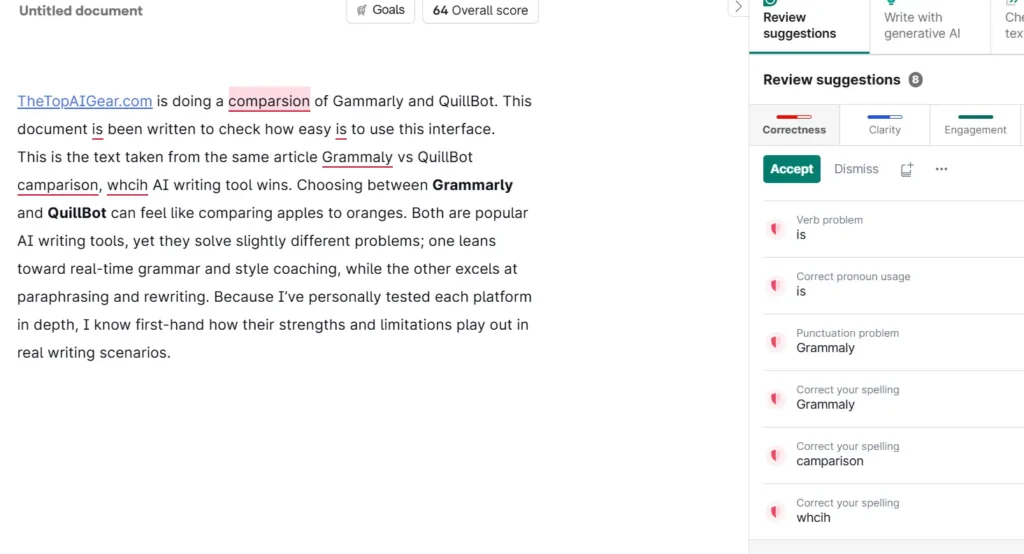
To evaluate their real-world accuracy, I conducted a more than 100-word document test using the grammar checker of both tools. Grammarly flagged eight errors in total: four spelling mistakes, three grammar issues, and one clarity suggestion. Upon reviewing each correction, I found that all of Grammarly’s detections were accurate and contextually justified.
However, QuillBot surprised me with its deeper catch rate. It identified eight errors: four spelling, three grammar, and one stylistic error. On closer inspection, QuillBot’s spelling and grammar detections were spot-on, and the suggested fixes were precise. The only questionable flag was the stylistic correction changing “first-hand” to “firsthand.” This difference appeared to stem from regional preference rather than an actual mistake, as even switching to UK English did not alter the suggestion.
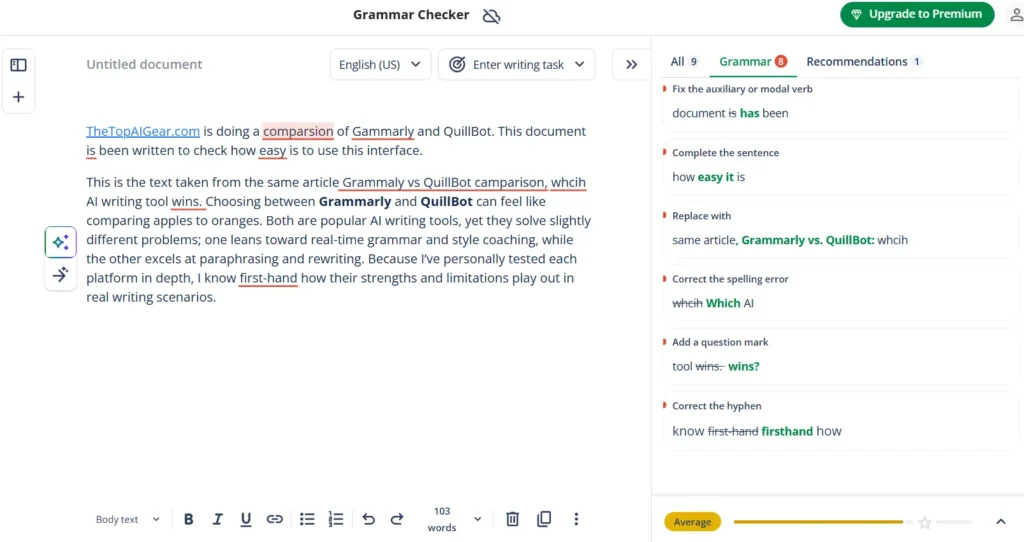
Interestingly, both tools demonstrated strong performance. Despite Grammarly’s dominance in the Grammar Checker category, a surprising outcome given by QuillBot with it’s accuracy,
Verdict: Surprisingly, Grammarly and QuillBot both emerge as winners.
2.2 QuillBot vs Grammarly: AI detection (can they spot AI-written text?)
To evaluate how well QuillBot can detect AI-generated content in real-world writing, I conducted two detailed tests using documents of over 100 words each.
In the first test, the document was entirely handwritten by me. In the second part of the text was written by me, while the remaining portion was generated by ChatGPT. To my surprise, QuillBot AI Detector identified both cases with impressive precision, instantly recognizing the first document as 100% human-written and the second as 60% AI-generated and 40% human-written.
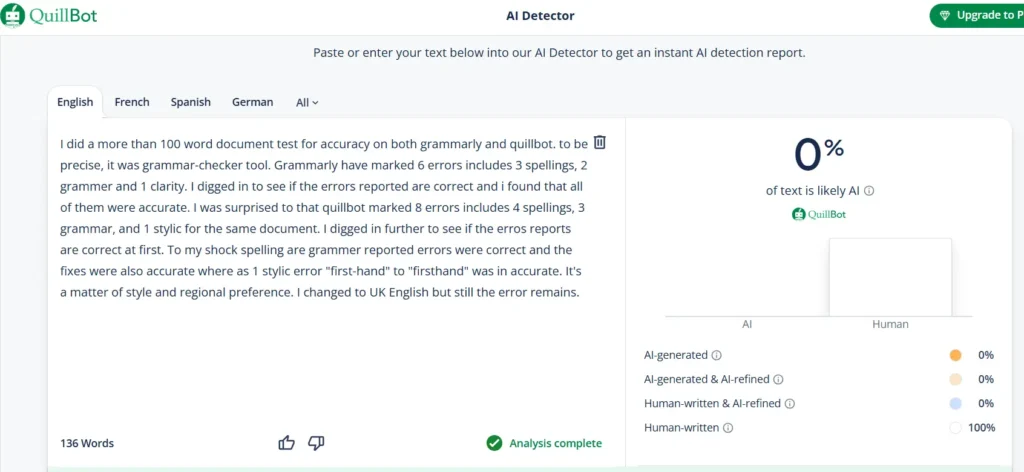
This shows how significantly QuillBot’s AI Detector has improved, not just in speed but also in reliability. Another major advantage is that QuillBot offers this feature for free, making it accessible to all users.
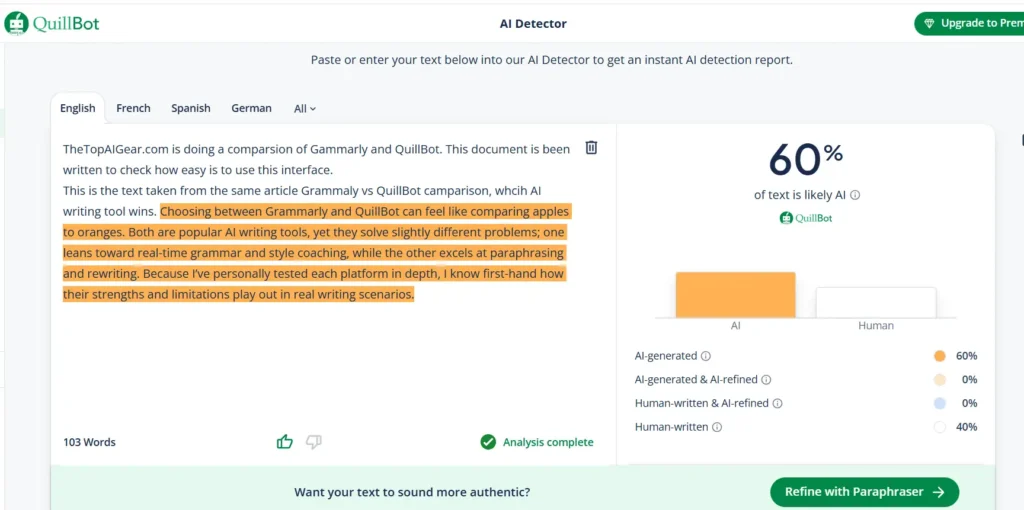
In contrast, Grammarly’s AI detection is integrated within its Plagiarism Checker, which is available only under the Premium (Pro) plan. Grammarly flags AI-written content during plagiarism checks, whereas QuillBot keeps its AI Detector as a separate, standalone tool, making it both simpler and more convenient to use.
Verdict: QuillBot is the clear winner, delivering near-perfect accuracy and offering a free, dedicated AI Detector that performs exceptionally well in real-world tests.
🧠 Want to Improve Your Accuracy Instantly?
🤖 3. QuillBot vs Grammarly: Core Writing & Editing Features Comparison
When it comes to polishing your content, both Grammarly and QuillBot bring strong tools to the table, but they shine in different places. Below is a side-by-side look at what each does best, followed by where they may fall short.
3.1 Grammar Checker, Spelling, & Punctuation
Grammarly has long set the benchmark in grammar and writing accuracy. With its vast linguistic database and sophisticated AI models, it still excels at identifying nuanced errors from misplaced modifiers and inconsistent capitalization to subtle prepositional issues and awkward phrasing. Its color-coded, context-aware feedback remains one of the best in the industry, helping users not just correct mistakes but also understand the reasoning behind them.
However, QuillBot has clearly closed the gap. After introducing its advanced grammar checker, it’s no longer just a paraphrasing tool, it’s now a highly capable writing assistant. In my real-world writing accuracy testing, QuillBot actually is head to head with Grammarly in grammar and spelling accuracy, correctly identifying all errors and Its contextual explanations are detailed. The interface is intuitive, and its overall correction quality feels more polished than ever.
While Grammarly still edges out slightly in stylistic finesse and tone adaptability, QuillBot’s Grammar Checker now rivals Grammarly’s performance in pure error detection.
Verdict: QuillBot is surprisingly head-to-head with Grammarly in core grammar checking, proving that it’s no longer just catching up, it’s truly competing.
3.2 Clarity, Tone, Style, & Vocabulary Enhancement
Grammarly continues to lead the way when it comes to improving clarity, tone, and vocabulary. With the addition of AI agents designed for tone detection, audience alignment, and contextual word choice, Grammarly now delivers far more than surface-level corrections. It refines your writing to make it clearer, more concise, and perfectly aligned with your communication goals, whether you want your content to sound professional, persuasive, or polished.
On the other hand, QuillBot does provide clarity suggestions, but its primary strength still lies in rewriting and text transformation rather than nuanced stylistic coaching. While it helps improve sentence flow and readability, it lacks the depth of tonal guidance and vocabulary refinement that Grammarly now offers through its advanced AI models.
Verdict: Grammarly is the clear winner.
3.3 Paraphrasing & Rewriting: Which rewrites better?
I conducted a hands-on test comparing the paraphrasing and rewriting capabilities of Grammarly and QuillBot using the same more than 100 words of document for both tools. It’s important to clarify that Grammarly doesn’t offer a dedicated paraphrasing tool. Instead, paraphrasing is indirectly available through its Rewrite and Write with Generative AI features, with Rewrite being accessible only in the Pro version.
QuillBot, on the other hand, provides a fully functional paraphrasing tool even in its free plan, allowing users to rephrase up to 125 words at a time. Its dual-panel interface is intuitive the left panel is for pasting text, and the right panel displays the rephrased output once you click the “Paraphrase” button. What impressed me most is how QuillBot visually distinguishes changes: altered words appear in red, structural adjustments in orange, and unchanged sections in blue.
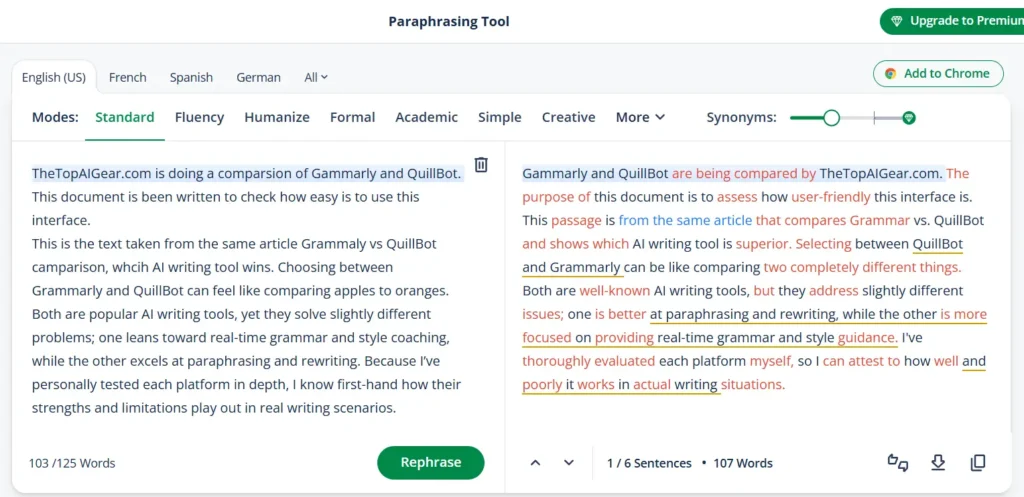
Moreover, you can use the up and down arrows to compare each original sentence with its rewritten version, making it easy to track changes. Even after paraphrasing, clicking on a specific word reveals alternative synonym suggestions to fine-tune your output further. Combined with multiple writing modes, tone options, and multilingual support, QuillBot clearly stands out as the most comprehensive paraphrasing solution available.
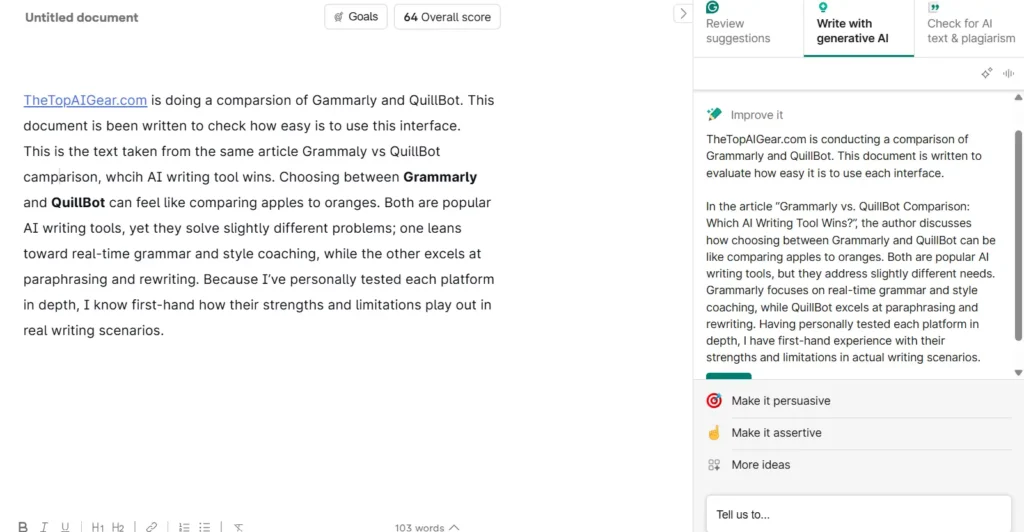
Grammarly, by contrast, focuses more on rewriting sentences for clarity, tone, and correctness rather than full-scale paraphrasing. Its Write with Generative AI feature improves grammar, eliminates spelling mistakes, and offers stylistic refinements such as making the text more persuasive or assertive, but it doesn’t match QuillBot’s depth in rewording flexibility or user control.
Verdict: QuillBot is the clear winner, offering unmatched paraphrasing accuracy, flexibility, and style control.
🧩 4. QuillBot vs Grammarly: How Robust Is the Plagiarism Checking?
I conducted a plagiarism test using a document containing several hundred words to evaluate the accuracy and robustness of both Grammarly and QuillBot. Based on my research and insights from third-party testing, a few clear observations emerged.
First and foremost, both Grammarly and QuillBot offer plagiarism detection only within their premium (Pro) plans, meaning the feature isn’t available to free users. Additionally, QuillBot’s premium plan imposes a 25,000-word monthly limit, whereas Grammarly provides unlimited plagiarism checks in its Pro version, which also integrates AI detection.
Moving on to the test itself, I copied a sample directly from a previously published article, a text that should ideally trigger a 100% plagiarism detection rate. Surprisingly, QuillBot detected only parts of the content and missed a significant portion of the plagiarized text. Grammarly’s results were also similar, failing to identify the complete duplication.
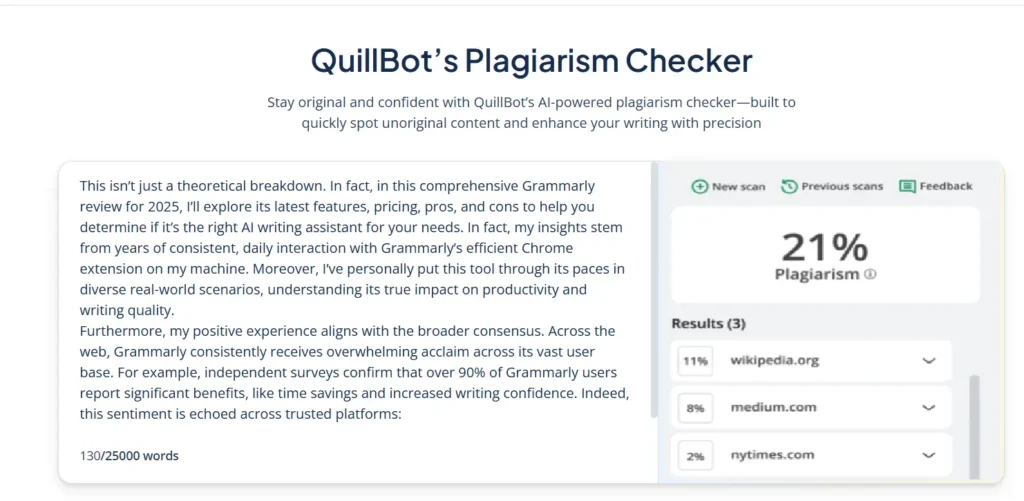
While both tools are evolving and heavily investing in AI detection capabilities, their plagiarism modules still need improvement. Ironically, earlier-generation plagiarism tools were often better at catching copied material and even cited original sources more accurately. Today, despite technological advances, both Grammarly and QuillBot seem to struggle with basic detection that other modern tools handle more precisely. Overall, I expected stronger results, especially from tools of this caliber. However, both were somewhat disappointing in their plagiarism detection accuracy.
Verdict: Neither tool stands out as a clear winner. However, in a head-to-head comparison, Grammarly and QuillBot perform on nearly equal footing in this category.
⚡5. Grammarly vs QuillBot: Ease of Use & Which UI Suits You Best?
5.1 Grammarly Ease of Use
To start using Grammarly, you simply need to create a free account, either by signing up with your email or using your Google account. The process is quick, straightforward, and takes only a few seconds. Once logged in, you’re greeted with a clean, minimalist dashboard where you can either create a new document or upload an existing one for editing.
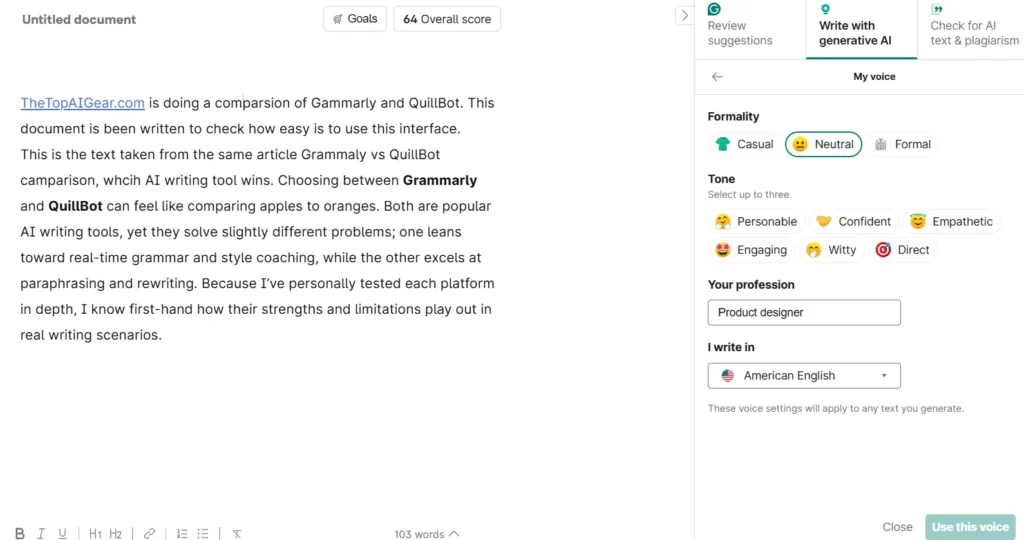
After opening a document, Grammarly presents an intuitive Grammar-Checker editing interface with a performance score out of 100 displayed at the top. Clicking this score reveals deeper insights such as speaking time, reading time, word count, readability, and vocabulary range. You can even download a detailed performance report in PDF format, which is especially useful for professionals or students who want to track their writing progress.
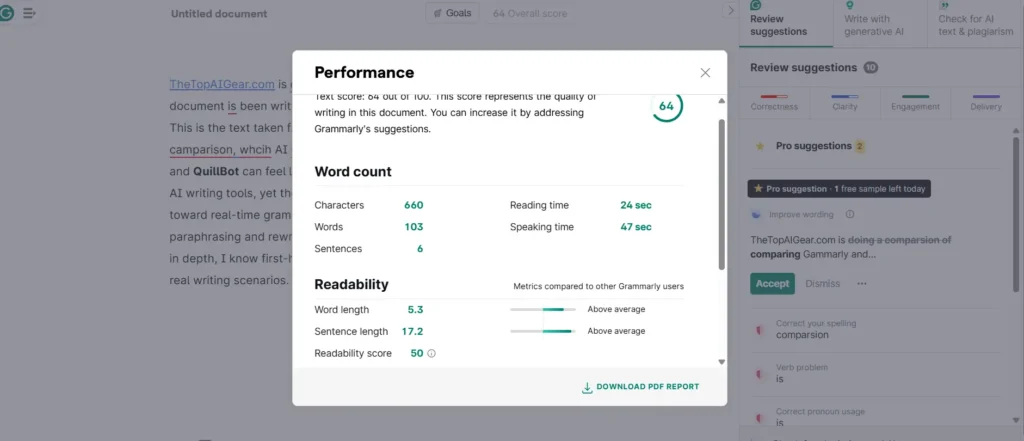
Grammarly highlights errors using different color-coded underlines to make the review process effortless:
- Red for spelling and grammar mistakes
- Blue for clarity issues
- Green for word choice or synonym suggestions
- Purple for tone and delivery feedback
What stands out most is Grammarly’s contextual explanation of each correction. Instead of just marking mistakes, it teaches you why something is wrong and how to improve it, a huge plus for anyone wanting to develop stronger writing skills. Furthermore, you can accept corrections instantly, and Grammarly automatically updates your text.
If you wish to customize your writing experience, the “Goals” panel at the top of the interface allows you to set personalized objectives. Once customized, Grammarly tailors its suggestions accordingly to match your chosen tone, intent, and audience.
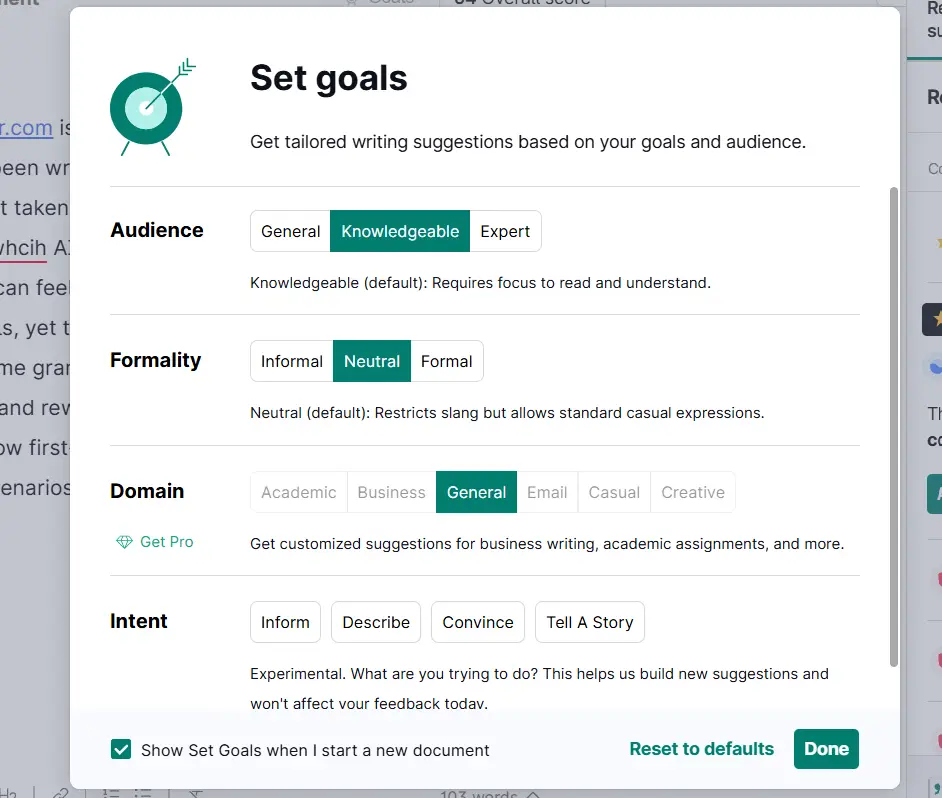
There’s also a “Write with Generative AI” option covered in detail in the new AI feature section below. What I particularly love about Grammarly is its consistent interface across all platforms. You simply download the extension, and it seamlessly integrates into almost everywhere, ensuring the same smooth experience wherever you write.
Overall, I found Grammarly’s interface exceptionally user-friendly, well-organized, and smooth to navigate. Every feature is logically placed, ensuring a zero learning curve even for beginners. After thoroughly testing it, I can confidently say that Grammarly offers one of the most seamless and intelligent UI experiences among AI writing tools.
5.2 QuillBot Ease of Use
One of the best things about QuillBot is that you don’t need to sign up or log in to use its free Grammar Checker editor simply head to the website and start writing right away. You’re greeted with a clean, minimalist dashboard, where the left-hand pane neatly displays all the tools QuillBot offers. However, it’s important to note that document changes are not saved unless you log in to your account.
The Grammar Checker editor provides flexible options, you can upload a file, paste your text, or start writing directly. What I particularly love about QuillBot’s editor is how feature-rich and visually clean it is. Similar to Grammarly, QuillBot also uses color-coded underlines to make the review process effortless:
- Green for spelling, grammar, engagement, and delivery issues
- Orange for clarity and fluency improvements
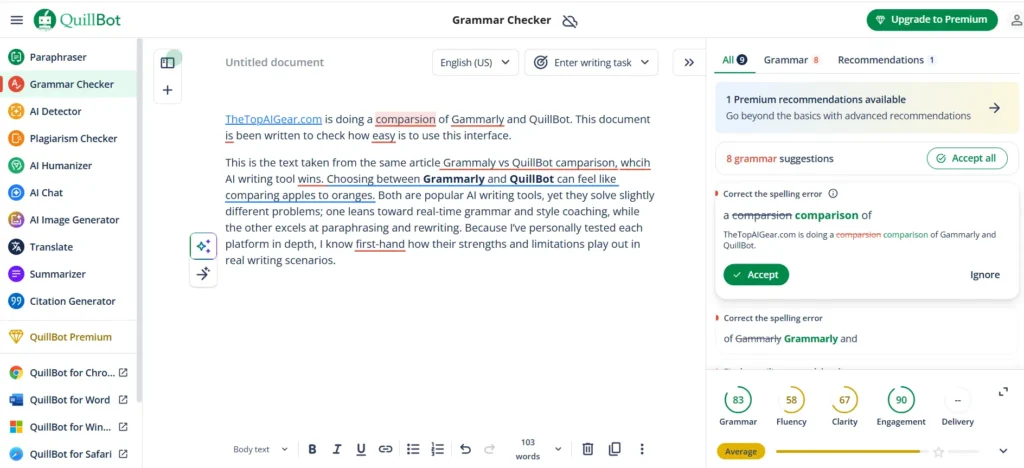
Similar to Grammarly, QuillBot features an intuitive editing interface that displays an overall writing score (out of 100) at the bottom right corner. Clicking this score provides deeper insights into your text’s grammar, fluency, clarity, engagement, and delivery. What truly impressed me was the additional analytics that appear below including the sentiment analysis (negative, neutral, or positive) and readability levels categorized as School, College, or Professional. You’ll also find helpful details such as word count and estimated reading time. However, unlike Grammarly, QuillBot does not currently offer the option to download a detailed performance report in PDF format.
In addition, QuillBot includes an “Enter Writing Task” option at the top much like Grammarly’s “Goals” feature. You can select from several predefined writing tasks such as research paper, business email, or business memo, and QuillBot adjusts its feedback accordingly. This feature is particularly useful for professionals, students, and business owners who want more context-aware suggestions.
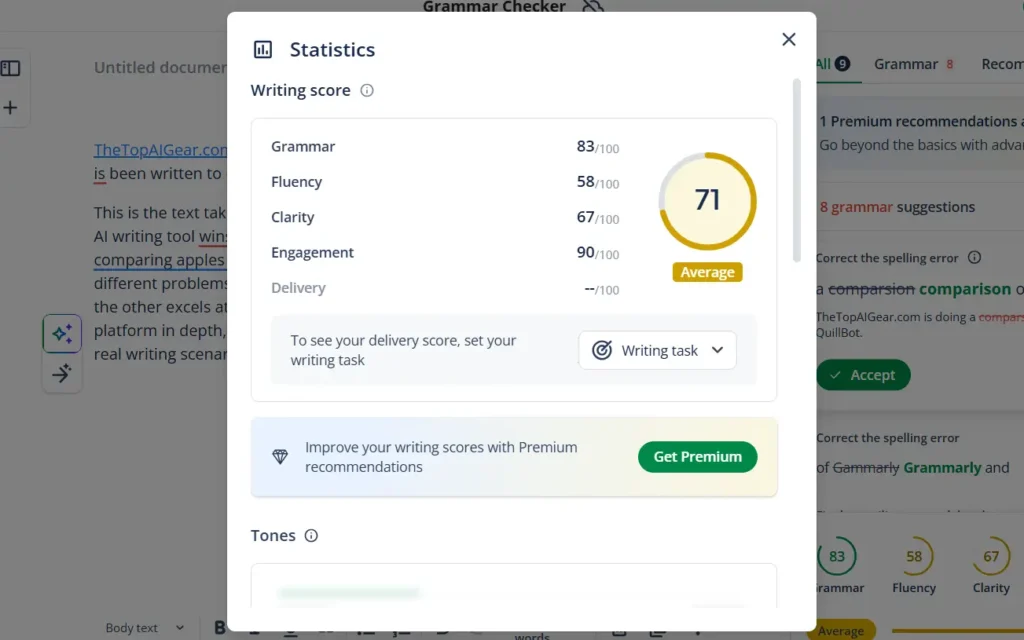
There’s also a convenient language selection option at the top, allowing users to switch between supported languages seamlessly. What stands out the most, though, is QuillBot’s contextual explanation for each correction. Instead of merely flagging errors, it teaches you why something is wrong and how to fix it a huge plus for anyone aiming to improve their writing skills. Moreover, you can instantly “Accept All” corrections, and QuillBot will automatically update your document. To enhance accessibility, you can also download the browser extension, which embeds QuillBot into various platforms and tools you use daily.
Overall, I’m impressed by how much QuillBot’s grammar-checking capabilities and overall UI have evolved. Its interface is simple, well-organized, and incredibly easy to navigate offering a near-zero learning curve, even for first-time users.
Verdict: After testing both, I found Grammarly and QuillBot equally intuitive, clean, and effortless to use, making them joint winners for ease of use.
💰 6. QuillBot vs Grammarly Pricing Plans in 2026: Free vs Paid Comparison
6.1 Free Plan Comparison
| Pricing Plans | Grammarly | QuillBot |
|---|---|---|
| Free | Basic grammar, spelling & punctuation checks; tone detection; & functions as a free AI writing assistant with 100 generative AI prompts per month. | Access to Standard and Fluency paraphrasing modes, Basic grammar and spell check, 125 words paraphrasing, Generate basic summaries, Humanize text in Basic mode, Access AI Detector (limited words) |
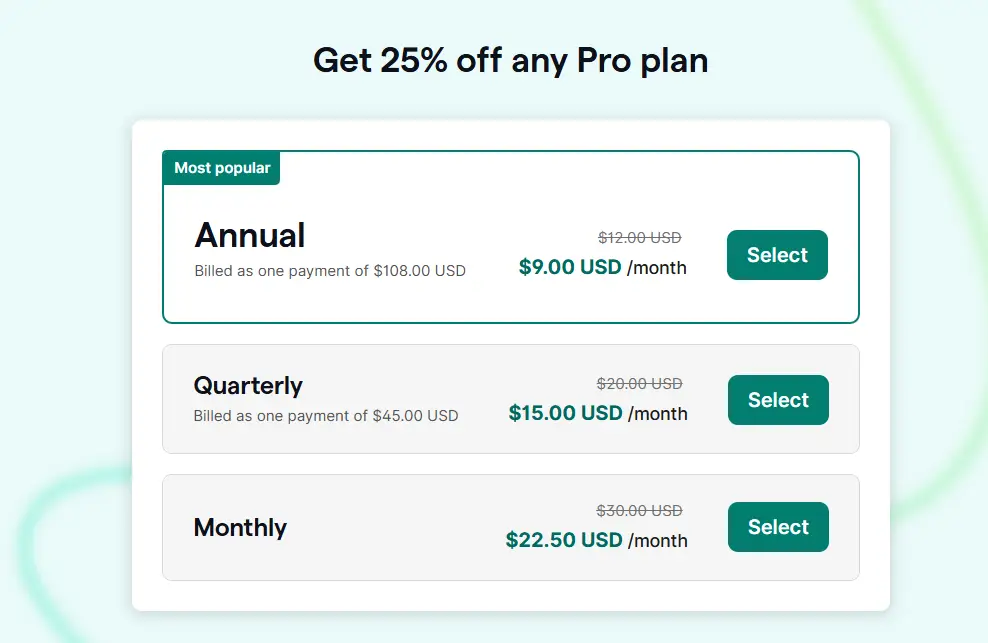
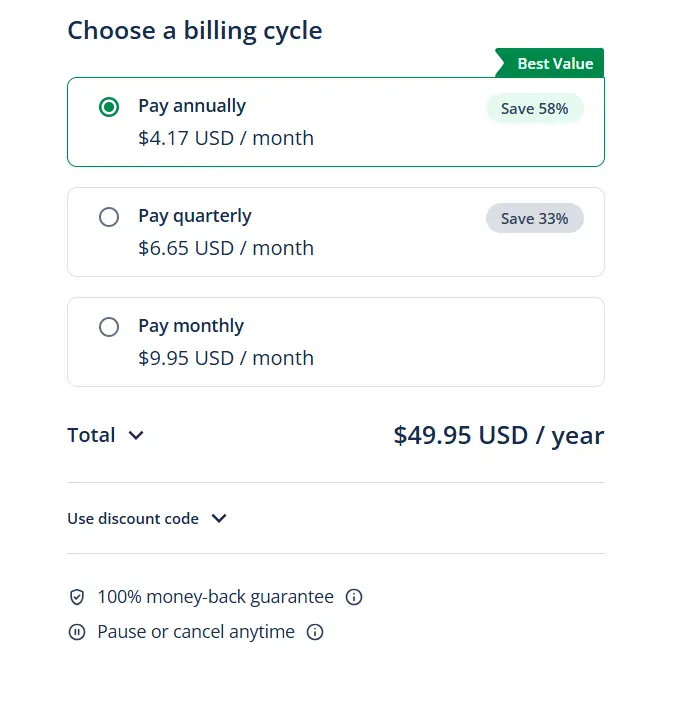
| Monthly | $22.5 | $9.95 |
| Quarterly | $15 | $6.65 |
| Annually | $9 | $4.17 |
Grammarly
QuillBot
6.2 Premium Feature Differences
| Grammarly | QuillBot |
|---|---|
| Advanced clarity, conciseness & readability improvements | Unlocks all modes of Paraphrasing with no word limit |
| Full sentence rewrites | Invent your own unlimited paraphrasing modes |
| Advanced tone adjustments & voice profiles | Access to advanced writing suggestions and tone insights |
| Detect Plagiarism and AI generated text | 25,000 words per month plagiarism detection |
| Enhanced Generative AI Quota: Approximately 2,000 AI prompts available per month | Humanize text in advanced mode unlimited times |
| Citation Fixes | Create custom summaries with summarize text limit increased from 1200 to 6000 words |
| Enterprise level privacy & security; account roles, permissions & feature management hub | Unlock faster processing speeds |
| Priority Customer Support | Priority Customer Support |
🤖 7. QuillBot vs Grammarly: AI Content Generation, Extra Capabilities / New Features
7.1 Grammarly Write with Generative AI
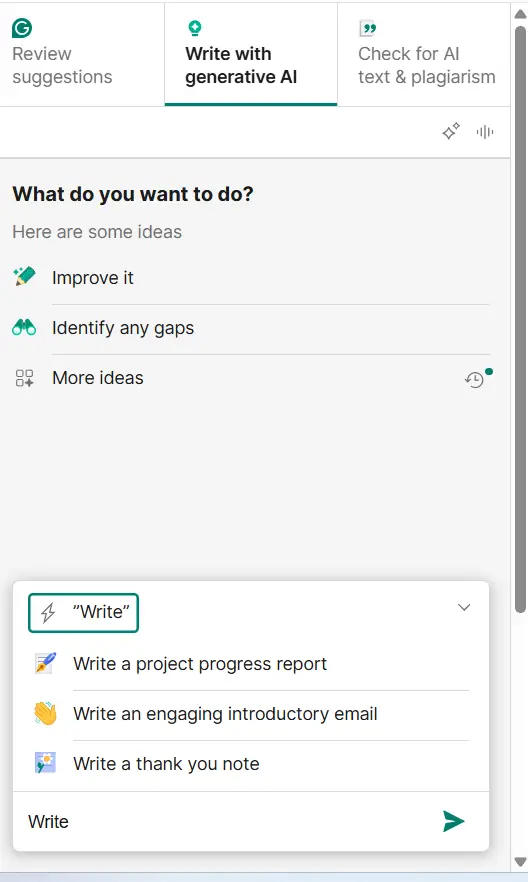
Grammarly has recently introduced this feature, a powerful addition that works much like ChatGPT to generate high-quality content on demand. For instance, you can ask it to create a 100-word article, and it will instantly produce a well-structured draft with multiple fine-tuning options. The intelligent prompts offered at the beginning of the writing process make content generation smoother and more guided.
Moreover, you can enhance the text further by identifying gaps, adjusting tone, or rewriting sections to make them shorter, simpler, or more persuasive. There’s even an option to explore “more ideas,” making it incredibly flexible for various writing needs. Overall, it’s a fast, intuitive, and most impressively free-to-use feature that significantly elevates Grammarly’s value for writers and professionals.
👉 To explore all Grammarly features in detail, visit the Grammarly Review – Features Section.
7.2 QuillBot AI Image Generator
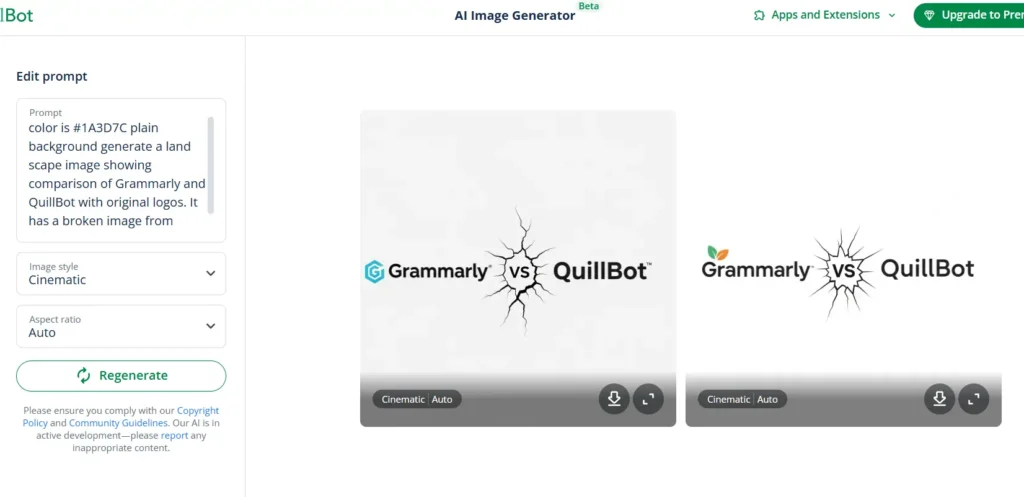
QuillBot has expanded its creative suite with an exciting new addition, the AI Image Generator. While still in its early phase, this feature performs impressively well for a writing tool. You simply enter a prompt, select the image style, and choose an aspect ratio, after which QuillBot generates two distinct images. You can then refine results by tweaking the prompt, regenerating, zooming in, or downloading the final visuals. Though not yet as advanced as dedicated image generators, it’s a strong step forward for QuillBot, adding visual creativity to its already diverse feature set.
👉 To see all QuillBot features in action, visit the QuillBot Review – Features Section.
🔗 8. Integrations & Platform Support: Where Each Tool Fits in Your Workflow?
In a real writing environment, it’s not enough for an AI writing tool to work well in isolation. It must integrate seamlessly into the apps and platforms you already use. Whether you’re drafting emails, working in Google Docs/Word, or toggling between browser tabs, integration support significantly influences your experience. Your workflow isn’t limited to a browser window. How well a tool integrates with browsers, desktop apps, mobile apps, and office suites can make or break its practicality. Below, we compare QuillBot and Grammarly across those dimensions, then conclude on which tool wins in practice.
8.1 Grammarly vs QuillBot: Browser Extension & Integration Comparison
8.1.1 Grammarly Supported Extensions & Apps
- Browser extensions (Chrome, Firefox, Edge, Safari)
- Desktop application for Windows & macOS
- Word / Outlook add-ins
- Mobile keyboard apps (iOS, Android)
It covers more ground in terms of platform reach. Its native desktop app gives deeper OS-level support (e.g., system-wide text checking), which QuillBot lacks on Windows.
8.1.2 QuillBot Supported Extensions & Apps
- Browser extensions (Chrome, Edge)
- Desktop application for macOS
- Word add-in
- Mobile keyboard apps (iOS, Android)
QuillBot does not offer a desktop application for Windows (Windows native app), but supports macOS. Meanwhile, its browser extensions and mobile apps allow rewriting, grammar checks, paraphrasing, and summarization right within the apps you use daily. While both tools embed into browsers effectively, Grammarly boasts deeper ecosystem coverage, especially on desktop OS and productivity suites.
Verdict: Grammarly is the winner because of overall platform coverage, you can use Grammarly in nearly any writing environment seamlessly.
⚖️ 9. Grammarly vs QuillBot: Pros & Cons Side-by-Side Table
9.1 Pros
| Grammarly | QuillBot |
|---|---|
| Grammar, spelling, and punctuation detection in the free tier | Powerful paraphrasing and AI detection tools in the free tier |
| Strong tone, style, clarity, and vocabulary suggestions | Clearly marked structural and word changes (color-coded) |
| Uniform UI across desktop, browser, mobile, and word processors | Synonym suggestions and multi-mode options |
| Generative AI feature | Improved AI detector and solid accuracy |
| Diversified color-coded error highlighting makes the review process effortless | Affordable |
(For a deeper look at AI vs human content quality, check AI Writing vs Human Writing)
9.2 Cons
| Grammarly | QuillBot |
|---|---|
| No dedicated paraphrasing tool in the free version | Free tier has a word limit per use |
| Plagiarism & AI detection are only available under Pro | Stylistic consistency and tone control are slightly less refined |
| Cost is higher for full access | Plagiarism detection misses some content |
| It doesn’t match QuillBot’s rewording flexibility or user control | No full Windows desktop app |
👥 10. Which Tool Is Best for Students, Professionals, or Marketers?
10.1 QuillBot vs Grammarly for academic writing: which is better?
When considering the best AI writing tool for students, professionals, or marketers, context plays a critical role. Based on real-world use and platform capabilities:
- Students often need strong grammar feedback, plagiarism checks, inline writing suggestions, and citation support. Grammarly is built with these needs in mind it provides real-time writing feedback, plagiarism scanning, citation insertion tools, and “Authorship” support to help manage AI use responsibly.
- Professionals and marketers prioritize clarity, tone consistency, brand voice, and workflow integrations (Google Docs, Word, email, CMS). QuillBot offers robust paraphrasing, rewriting modes, and inline editing with contextual explanations features that help shape messaging without manual rework.
- When it comes to scalability and team use, Grammarly’s suite of new AI agents (e.g., proofreader, citation assistant, paraphrase agent, AI grader) helps automate parts of the writing pipeline, which is valuable for professionals managing content at scale.
- QuillBot, meanwhile, integrates smoothly with popular platforms and supports multi-mode paraphrasing and grammar checking, making it a compelling choice for marketers who rapidly repurpose content across channels.
Ultimately, the best tool depends on your primary need:
- If your main priority is academic integrity, detailed feedback, and institutional support, Grammarly stands ahead.
- If you frequently rewrite, repurpose, and adapt content, QuillBot’s paraphrasing + editing depth is highly valuable.
In many workflows, combining both tools can yield the most balanced results, leveraging Grammarly’s editorial polish and QuillBot’s rewriting flexibility.
🙋 11. FAQs
11.1 Does Grammarly paraphrase text?
Yes, but only for clarity and tone, QuillBot leads in paraphrasing with multiple rewrite modes and styles.
11.2 Is QuillBot a good grammar checker?
Absolutely. In fact, based on hands-on testing, QuillBot is now head-to-head with Grammarly in grammar-checking accuracy. It detects real-world grammatical, spelling, and punctuation issues with precision. Grammarly remains slightly stronger in tone and stylistic guidance, but QuillBot has clearly raised the bar for core grammar detection.
11.3 Do both tools integrate with Google Docs?
- Grammarly: Yes. Grammarly’s browser extension enables it to function in Google Docs. Once installed, Grammarly will highlight grammar and style issues as you type within Docs. It has long worked inside Docs via its Chrome extension.
- QuillBot: Yes, QuillBot also integrates with Google Docs via its Chrome extension. The QuillBot widget appears on the side of your document when using Docs. To activate it, you install the QuillBot extension from the Google Workspace Marketplace, then grant document access.
11.4 Are Grammarly and QuillBot the same?
No. Grammarly is primarily a grammar, style, and tone tool with some AI rewriting features. QuillBot is primarily a paraphrasing and summarizing tool with added grammar checking.
11.5 QuillBot vs Grammarly Free Plan: Which is More Generous?
QuillBot’s free plan is more flexible, offering paraphrasing and grammar tools, while Grammarly’s free version is more limited.
📣 Final Verdict: Grammarly or QuillBot; Which Is Better in 2026?
After testing both tools extensively, my takeaway is clear: while Grammarly excels in real-time grammar guidance, tone, and style coaching across emails, documents, and social platforms, QuillBot is head-to-head in raw grammar accuracy and takes the lead in paraphrasing quality and overall value-for-money performance. Grammarly feels more like an always-on writing coach with tighter integrations and more refined editorial suggestions, whereas QuillBot shines in paraphrasing, summarizing, and multilingual rewriting, offering remarkable accuracy and flexibility at a lower price point.
Which One Should You Choose?
Think of it this way:
- Choose Grammarly if you’re focused on perfecting your own writing and want deep, context-aware style guidance.
- Choose QuillBot if you’re focused on reworking or repurposing existing content and value fast, flexible rewriting modes.
Either way, both tools are affordable to test, and their free plans give you enough access to decide which fits your workflow best.
🚀 Your Turn – Test the Winner Yourself!
Looks like QuillBot is the clear winner here. Until I saw a link to this test on Reddit, I’m not sure I’d ever even heard of QuillBot. I’ll have to try it out sometime. Never was too impressed with Grammarly.
Thanks for sharing your valuable feedback. Correct, QuillBot has covered a lot of ground and it’s evident in our recent testing. QuillBot is head-to-head in raw grammar accuracy and takes the lead in paraphrasing quality and overall value-for-money performance.